
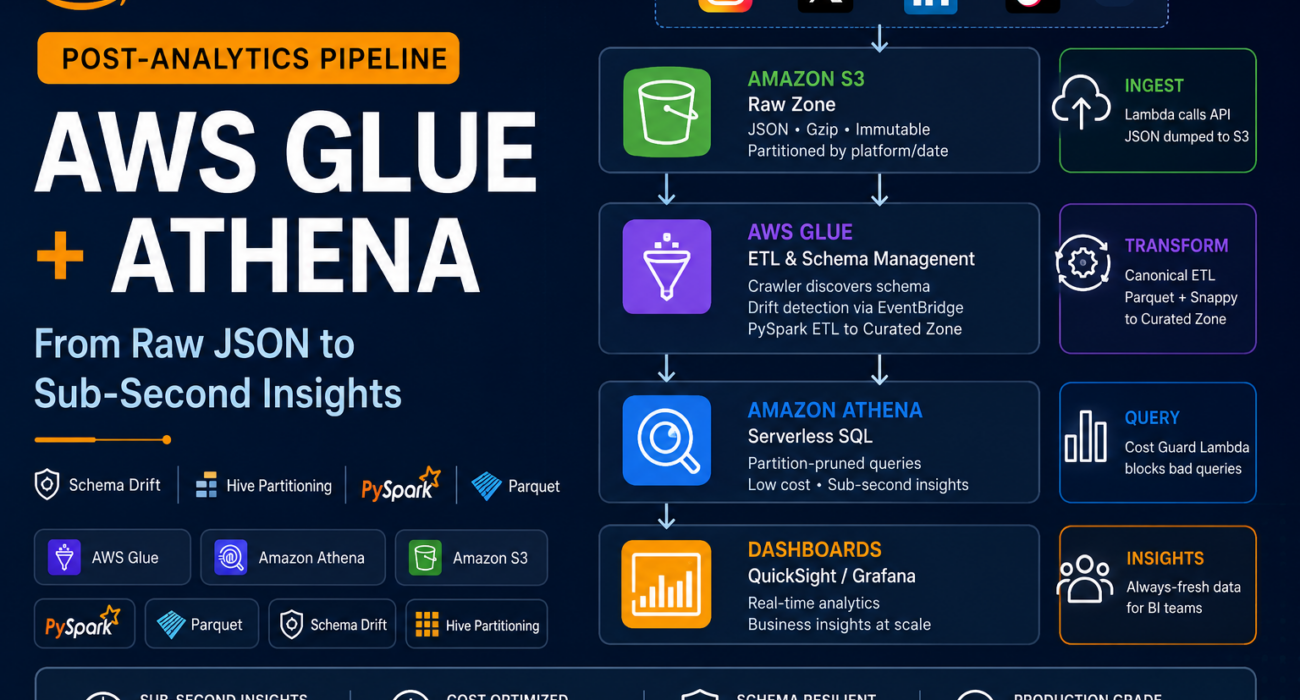
Introduction
Modern applications generate enormous volumes of post engagement data across social platforms—Instagram, X (Twitter), TikTok, LinkedIn, and others. Processing this data reliably for business intelligence requires a pipeline that is not just fast, but resilient to the constant changes social APIs introduce without warning.
Many engineering teams build their first analytics pipeline expecting stability. They wire up an Amazon S3 bucket, run an AWS Glue Crawler, and query with Amazon Athena—only to discover weeks later that a platform silently renamed a JSON key, and their dashboards have been showing nulls ever since.
In this article, we explore how to build a production-grade post-analytics pipeline on AWS that handles schema drift automatically, partitions data intelligently to control Athena query costs, and gives your BI team reliable, always-fresh data.
The Challenge with Naive Pipelines
Many teams start with a straightforward setup: a Lambda function calls the platform API, dumps JSON to Amazon S3, an AWS Glue Crawler auto-discovers the schema, and Amazon Athena queries the table. This works perfectly on day one.
However, as the pipeline runs in production, a set of familiar problems emerge:
- Platform APIs change JSON keys without versioning or announcement.
- New engagement metrics appear mid-flight, breaking downstream
SELECT *queries. - Athena bills spike because queries scan entire tables instead of targeted partitions.
- Schema changes propagate silently and corrupt weeks of historical reporting.
- Rollback requires manual effort, causing hours of dashboard downtime.
Schema drift is not an edge case. It is the default behavior of every social platform API over any meaningful time horizon. Design your pipeline to expect change and handle it automatically rather than reacting after failures occur.
What is a Schema-Resilient Analytics Pipeline?
A schema-resilient pipeline treats the upstream API contract as inherently unstable. Instead of trusting the schema to remain constant, it continuously validates incoming data against a registered canonical schema, detects changes automatically, and applies safe resolution strategies before data reaches Amazon Athena.
The pipeline is built on three core AWS services: Amazon S3 for raw and curated storage, AWS Glue for crawling, ETL transformation, and schema management, and Amazon Athena for serverless SQL querying over the curated data.
How the Pipeline Works
The pipeline follows a controlled, multi-stage flow from raw API responses to business intelligence dashboards. Each stage has a clearly defined responsibility, validates data before passing it forward, and provides predictable failure handling to ensure reliable analytics in production.
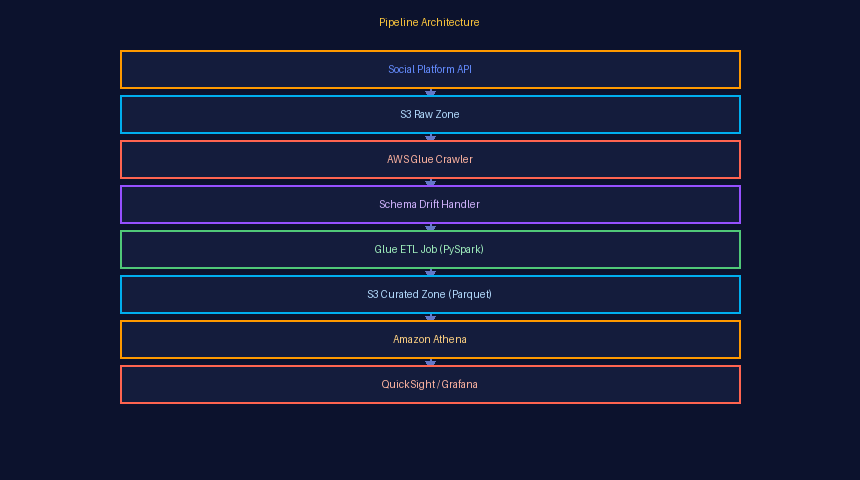
▌ Pipeline Architecture
| Three-Stage AWS Architecture | ||
|---|---|---|
⚙️ Ingest
|
🔄 Transform
|
🔍 Query
|
▌ Designing the S3 Raw Zone
The raw zone is the foundation of the pipeline. Its most important property is immutability: once a file lands in the raw zone, it is never modified or deleted within the retention window. This provides replay capability—if a bug is found in the ETL logic, you can reprocess from the raw zone without losing any data. Raw zone files are organized by platform, then by time (year/month/day/hour). This enables AWS Glue Crawlers to discover partitions efficiently while allowing ETL jobs to apply push-down predicate filtering. Files are stored as compressed JSON (gzip) to reduce storage costs while preserving the complete API response. The raw zone is never queried directly by Athena; it serves only as an audit trail and ETL input.| 💡 Design Principle: Treat the raw zone as your source of truth. Every recovery scenario—bad ETL logic, schema mishandling, or data corruption—starts with a replay from the raw zone. |
▌ AWS Glue Crawler: Schema Discovery
AWS Glue Crawlers inspect your S3 path and register schemas in the Glue Data Catalog. For production workloads, the crawler configuration must carefully manage schema changes.| 1 |
Schema Change Policy
The most common mistake is setting
|
| 2 |
Drift Detection via EventBridgeWhenever the crawler updates the Glue Data Catalog, it emits a Table State Change event to Amazon EventBridge. A Lambda function compares the new schema against the version stored in DynamoDB, classifies the change, and determines whether it can safely propagate. |
string to float—trigger an immediate Slack alert and automatic rollback. Additive changes (new columns) are allowed using a NULL backfill strategy.
▌ Managing Schema Drift
Schema drift refers to any structural change in incoming data compared to the registered schema. Every change is classified into one of four categories, each with a predefined resolution strategy.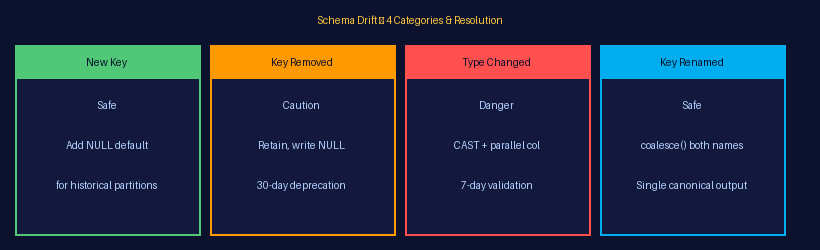
✅ New Key Added
This is the safest type of schema change. Add the new column with |
⚠️ Key Removed
Retain the existing column and populate missing values with |
🚨 Type Changed
Example: |
🔁 Key Renamed
Use |
| ⚠️ Schema Warning: Never automatically apply breaking schema changes. Type changes and column removals should always follow an alert-and-approval workflow before reaching the curated layer. |
▌ AWS Glue ETL Job: Canonical Transformation
The Glue ETL job is the heart of the pipeline. It reads from the raw zone, applies the canonical schema, handles drift resolution, and writes partitioned Parquet files to the curated zone. The job is written in PySpark and runs on an AWS Glue 4.0 environment.
✅ Pros / Strengths
|
❌ Cons / Limitations
|
◆ Canonical Schema Mapping
Instead of relying on the raw JSON structure to match the expected schema, the ETL job defines a canonical schema map—a dictionary that specifies every output column name, its data type, and an extractor function. The extractor handles all known aliases and type coercions so that the output remains consistent regardless of which API version produced the data.◆ Writing Partitioned Parquet
The ETL job writes data using PySpark’spartitionBy() with the partition key order of platform → year → month → day. Files are stored in Parquet format using Snappy compression, targeting file sizes between 128 MB and 512 MB for optimal Athena performance.
◆ Job Bookmarks
Glue Job Bookmarks prevent duplicate processing during retries. If a job fails midway and is restarted, bookmarks ensure that only unprocessed partitions are ingested. Without bookmarks, retries would process all partitions again, resulting in duplicate rows within the curated zone.▌ Hive Partitioning Strategy: Controlling Athena Costs
Amazon Athena charges $5 per terabyte of data scanned. On a dataset of even moderate size—such as 2 TB—a single unpartitioned query costs approximately $10. Multiply that across hundreds of analyst queries each day, and the monthly query cost can increase dramatically.
◆ Partition Column Order Matters
Always lead with platform—the highest-selectivity filter in post-analytics queries. A query filtering by platform immediately eliminates all other platforms’ data, which can represent 80% or more of the total dataset size.◆ The Cost Difference
A query filtering by platform, year, month, and day against a 2 TB dataset scans approximately 400 MB, reducing the query cost from $10.00 to under $0.01. Over a month of heavy analytical usage, this difference represents thousands of dollars in saved Athena charges.◆ Cost Guard: Blocking Unpartitioned Queries
Even with partitioned tables, a query withoutWHERE clause filters on partition columns triggers a full table scan. A Cost Guard Lambda intercepts Athena query submissions through a Workgroup policy, validates that partition predicates are present for large tables, and rejects queries that don’t include them before execution.
| 💰 Cost Benchmark: Implementing Hive partitioning with Cost Guard enforcement reduced a production analytics team’s monthly Athena bill from approximately $2,200 to under $2 while maintaining the same query volume. Storage costs also dropped by 75% through Parquet compression compared to CSV. |
▌ Deploying to the Athena Table
Once the Glue ETL job writes new partitions to the curated zone, Athena must be informed about the new partition paths. AWS Glue accomplishes this using theMSCK REPAIR TABLE command, which scans the S3 prefix and registers newly discovered Hive partitions in the Glue Data Catalog.
In production, this command is executed automatically at the end of every ETL job through an AWS Step Functions state machine. Manual execution is unnecessary, and operators are notified only if the repair step fails.
For high-frequency ingestion pipelines, ALTER TABLE ADD PARTITION is preferred over MSCK REPAIR TABLE because it registers only newly created partitions instead of scanning the entire table location, improving performance as partition counts grow.
▌ Monitoring and Alerting
A production analytics pipeline requires continuous monitoring across three critical layers: data quality, infrastructure health, and cost control.
📊 Data Quality
|
🖥️ Infrastructure
|
💸 Cost
|
▌ Instant Rollback Strategy
Maintaining an immutable raw zone enables rapid rollback. If an ETL job produces incorrect output because of a bug or an unexpected schema change, recovery follows this process:| 1 |
Drop Affected Curated Partitions from S3Remove only the impacted partition paths from the curated zone while leaving the raw zone completely untouched. This preserves the original source data for replay and recovery. |
| 2 |
Revert the Glue Catalog SchemaRestore the last known good schema version stored in Amazon DynamoDB, ensuring downstream services use a validated catalog definition. |
| 3 |
Replay the ETL JobRe-run the AWS Glue ETL job against the affected raw partitions after resetting Glue Job Bookmarks, ensuring only the required data is reprocessed. |
| 4 |
Re-register Partitions and Validate
Run |
| ⚡ Recovery Time: This rollback process typically completes in under 30 minutes, compared to hours of manual intervention for pipelines without raw zone replay. |
▌ Benefits of This Architecture
Organizations implementing this architecture consistently improve reliability, reduce operational costs, and increase developer productivity.
🛡️ Automatic Schema ResiliencePlatform API changes are automatically detected, classified, and resolved before they reach the curated layer, preventing downstream data quality issues. |
💰 Dramatically Lower Query CostsHive partitioning with enforced partition filters reduces Amazon Athena scan costs by more than 99% compared to unpartitioned CSV datasets. |
⚡ Faster Rollback from FailuresImmutable raw storage combined with schema version history enables complete pipeline rollback in under 30 minutes. |
📊 Reliable BI DashboardsCanonical schema mapping guarantees consistent column names and data types across API versions, ensuring reliable reporting and analytics. |
📈 Scalable to Any Platform VolumeParquet with Snappy compression and Hive partitioning scale efficiently as new platforms and larger datasets are added. |
✅ Operational ConfidenceTeams can confidently onboard new platforms because schema drift detection, validation, and recovery are systematic, automated, and fully auditable. |
▌ Real-World Use Cases
This architecture is suitable for organizations collecting post-performance data across multiple social platforms for analytics, reporting, and machine learning.- Social media management platforms tracking engagement KPIs across client accounts
- Marketing analytics teams measuring campaign performance across channels
- Media companies monitoring content virality and audience engagement
- E-commerce brands tracking organic social attribution for product launches
- SaaS analytics platforms delivering social insights to customers
▌ Best Practices
Follow these production-proven practices to maximize reliability and minimize Athena costs.| # | Best Practice | Why It Matters | Priority |
|---|---|---|---|
| 🔒 | Always treat the Raw Zone as immutable | Never overwrite or delete files during the retention period. | 🔴 High |
| 🚫 |
Set delete_behavior = LOG everywhere
|
Apply consistently across all AWS Glue Crawlers, including development environments. | 🔴 High |
| 🗂️ | Define a canonical schema with coalescing | Explicitly handle all known field aliases to maintain schema consistency. | 🔴 High |
| 📦 | Target Parquet file sizes of 128–512 MB | Prevent Athena performance degradation caused by excessive small files. | 🔴 High |
| 🛡️ | Enforce partition filters via Workgroups | Prevent expensive full-table scans and control Amazon Athena query costs. | 🟡 Medium |
| 📚 | Store schema history in DynamoDB | Maintain a 90-day schema history to support rollback and auditing. | 🟡 Medium |
| ⚙️ | Automate MSCK REPAIR TABLE using Step Functions | Remove manual operational work by automating partition registration. | 🟡 Medium |
| 📊 | Monitor NULL rates on critical columns | Provides an early warning signal for data quality issues after every ETL run. | 🟡 Medium |
▌ Conclusion
Building a post-analytics pipeline on AWS is straightforward initially. Keeping it reliable over time—as APIs evolve, schemas drift, data volumes grow, and cost pressures increase—requires careful architectural decisions at every layer. By combining AWS Glue schema discovery, event-driven drift detection, canonical ETL transformation, Hive-partitioned Parquet storage, and enforced partition filtering in Athena, organizations can build analytics pipelines that remain reliable, scalable, and cost-efficient.| 🎯 Core Principle: Design for schema drift, partition for cost efficiency, and version your schemas just as you version your application code. |