
Introduction
Kubernetes has become the industry standard for deploying and managing containerized applications at scale.
As organizations continue their cloud-native transformation journey, Amazon Elastic Kubernetes Service (Amazon EKS) has become a popular choice because it removes much of the operational complexity involved in managing Kubernetes control planes.
However, running Kubernetes securely is an entirely different challenge. One of the most common misconceptions is:
| “AWS manages EKS, so AWS manages Kubernetes security.” |
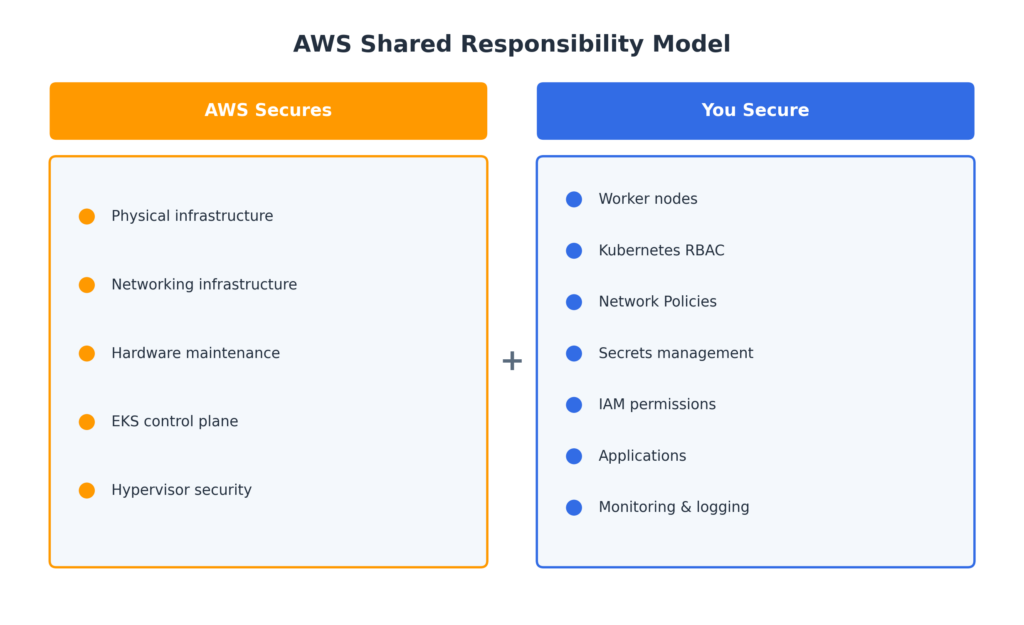
This is incorrect. Amazon EKS follows a Shared Responsibility Model. AWS secures the underlying infrastructure, while customers remain responsible for securing workloads, networking, secrets, permissions, and applications.
A single misconfiguration can lead to:
- Unauthorized access
- Lateral movement attacks
- Data breaches
- Compromised AWS accounts
- Production outages
This guide walks through practical Kubernetes hardening techniques and AWS-native security services that help build secure, scalable, and production-ready Amazon EKS environments.
AWS Shared Responsibility Model
Why Kubernetes Hardening Matters
Without proper hardening, organizations commonly face: Excessive Permissions: Users receive unnecessary access. Lateral Movement: Compromised pods can move across the cluster. Credential Leakage: AWS secrets become exposed. Misconfigured Workloads: Applications gain unauthorized access. Compliance Violations: Sensitive data remains unencrypted.Security Goals
Our goals are to:- Reduce attack surface
- Enforce least privilege
- Secure pod communication
- Protect sensitive data
- Improve visibility
- Increase resilience
Kubernetes Security Fundamentals
A secure Amazon EKS environment is built on four pillars.| RBAC Controls who can do what. | Network Policies Controls pod communication. |
| IRSA Controls AWS access for pods. | AWS KMS Protects sensitive data. |
RBAC (Role-Based Access Control)
RBAC enforces the principle of Least Privilege. Users should receive only the minimum permissions necessary to perform their tasks.Core Components
| Component | Description |
|---|---|
| Role | Namespace-level permissions |
| ClusterRole | Cluster-wide permissions |
| RoleBinding | Assigns a Role |
| ClusterRoleBinding | Assigns a ClusterRole |
RBAC Best Practices
- Use namespaces
- Use Roles whenever possible
- Avoid
cluster-admin - Separate environments
- Audit permissions regularly
Network Policies
By default, every pod can communicate with every other pod. Instead, implement a Zero Trust networking model to allow only the traffic that is explicitly required.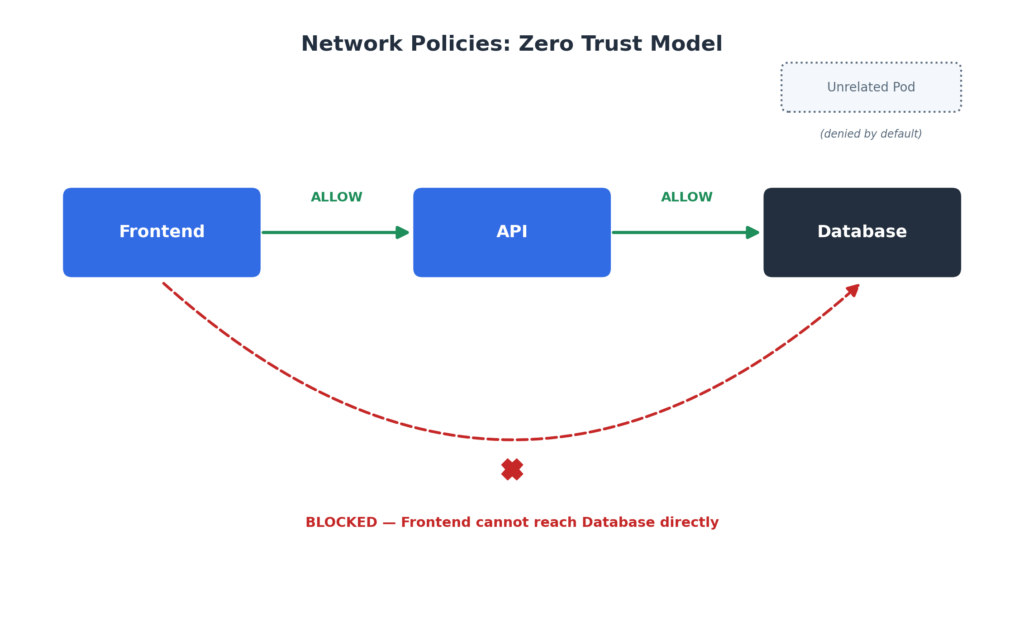
Best Practices
- Default deny
- Restrict ingress
- Restrict egress
- Namespace isolation
AWS EKS-Specific Security Features
This is the section many engineers overlook.
Secure the Control Plane
- Keep Amazon EKS versions updated
- Enable private API endpoints
- Restrict public API access
Enable Audit Logs
Enable:
- API
- Audit
- Authenticator
- Scheduler
- Controller Manager
Send logs to Amazon CloudWatch.
Secure Worker Nodes
- Use managed node groups
- Update AMIs
- Disable SSH
- Use Session Manager
Enable Image Scanning
Recommended tools:
- Amazon ECR
- Amazon Inspector
- Trivy
- Snyk
IAM Roles for Service Accounts (IRSA)
| ⚠️ Never store AWS credentials inside containers. |
Avoid:
AWS_ACCESS_KEY_ID,
AWS_SECRET_ACCESS_KEY
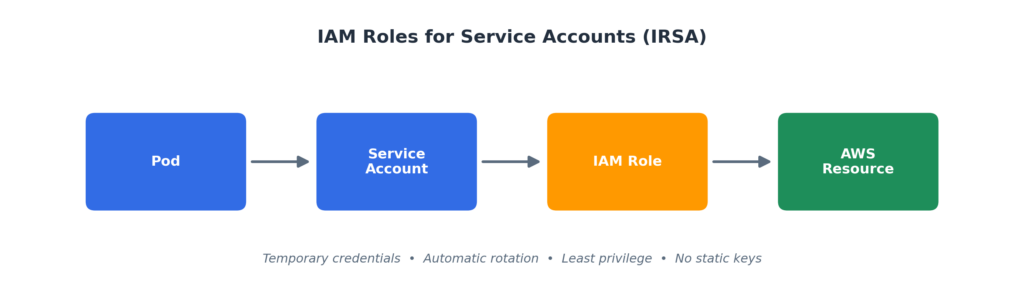
Best Practice: Use the IRSA (IAM Roles for Service Accounts) credential chain instead to provide temporary AWS credentials securely.
Benefits
- Temporary credentials
- Automatic rotation
- Least privilege
- Improved security
AWS KMS Encryption
Use AWS KMS to encrypt:
- Kubernetes Secrets
- S3 Buckets
- EBS Volumes
- RDS Databases
Benefits
- Centralized key management
- Compliance support
- Auditing
- Automatic rotation
| 🔐 Security Benefit: AWS KMS provides centralized encryption key management with automatic rotation, auditing, and compliance support for production Kubernetes environments. |
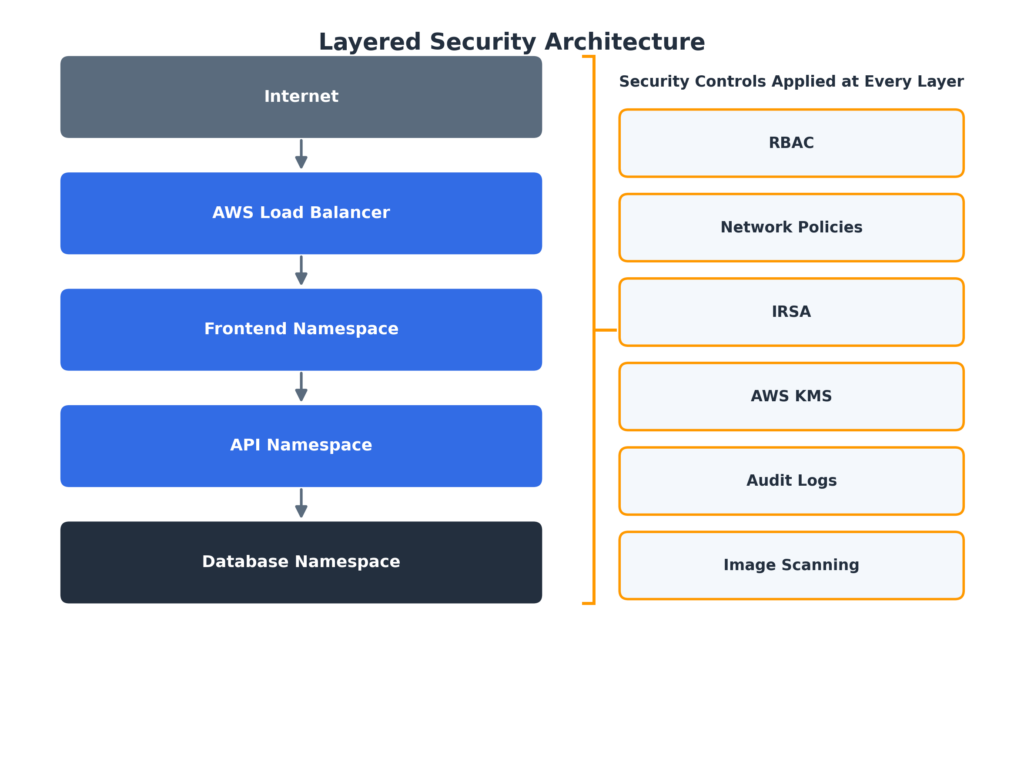
Layered Security Architecture
Real-World Security Scenarios
Scenario 1: The Over-Permissioned Developer
What Happened?
A SaaS company granted a junior developer cluster-admin access to avoid permission-related delays during development.
While troubleshooting an issue, the developer accidentally executed:
kubectl delete namespace payment-service
Unfortunately, the developer was connected to the production cluster instead of the staging environment.
Within seconds, payment services went offline, customer transactions failed, multiple applications crashed, and revenue was lost.
Problem
A developer accidentally deleted production resources.
Root Cause
- Excessive permissions
- No namespace isolation
- Lack of RBAC boundaries
- No audit monitoring
Solution
Implement:
- Namespace-based RBAC
- RoleBindings
- Environment separation
- Audit logging
|
💡 Key Takeaway: One mistake should never have the power to destroy an entire production environment. |
Scenario 2: The Compromised Frontend Pod
What Happened?
An attacker exploited a vulnerable npm package inside the frontend application.
Since no Network Policies existed, they were able to move laterally throughout the cluster.
The attacker discovered internal services, accessed databases, moved between pods, and exfiltrated customer data.
Over 100,000 customer records were exposed.
Problem
An attacker moved laterally through the cluster.
Root Cause
- No Network Policies
- No Zero Trust architecture
- No namespace isolation
- No egress restrictions
Solution
Implement a Deny All default policy, then explicitly allow Frontend → API and API → Database.
- Isolate workloads using namespaces
- Restrict egress traffic
- Continuously scan vulnerabilities
|
💡 Key Takeaway: Compromised containers are inevitable. Unrestricted lateral movement should never be. |
Scenario 3: The Leaked AWS Credentials
What Happened?
A developer hardcoded AWS credentials inside a container image.
Months later the image was accidentally pushed to a public repository where automated bots discovered the credentials.
Attackers accessed S3 buckets, enumerated AWS resources, and downloaded sensitive data.
The IAM user had AdministratorAccess, compromising the AWS account.
Problem
AWS keys were hardcoded inside a container.
Root Cause
- Static credentials
- Excessive IAM permissions
- No secret management
- No image scanning
Solution
Implement:
- IRSA
- AWS KMS
- AWS Secrets Manager
- Image scanning
|
🔐 Key Takeaway: No AWS credentials should ever exist inside containers. |
Production Hardening Checklist
A practical checklist to complete before and after deploying your Amazon EKS cluster to production.
- Enable private API endpoints and restrict public API access
- Keep EKS and node AMIs updated
- Use namespace-scoped Roles and RoleBindings
- Apply default-deny Network Policies
- Replace static AWS credentials with IRSA
- Encrypt Secrets, EBS, S3 and RDS using AWS KMS
- Enable CloudWatch audit logging
- Continuously scan container images
- Disable SSH and use Session Manager
- Separate staging and production environments
- Back up clusters using Velero
- Enforce policies with Kyverno or OPA Gatekeeper
- Review IAM and RBAC regularly
Recommended Security Tools
| Category | Tool |
|---|---|
| Vulnerability Scanning | Trivy |
| Image Scanning | Amazon Inspector |
| Container Registry | Amazon ECR |
| Monitoring | Prometheus |
| Visualization | Grafana |
| Logging | CloudWatch |
| Backup | Velero |
| Policy Enforcement | Kyverno |
| Policy Enforcement | OPA Gatekeeper |
Conclusion
Kubernetes security is not about enabling one feature. It is about building multiple layers of protection.
By combining:
- RBAC
- Network Policies
- AWS EKS native security
- IRSA
- AWS KMS
- Audit logging
- Image scanning
- Continuous monitoring
Organizations can build secure, scalable, and production-ready Kubernetes platforms.
| Security is not a one-time setup. It is a continuous process of reviewing, monitoring, and improving your security posture as your Kubernetes environment grows. |